
Version 0.10.0 gives the deck another useful page beside subscription Usage: System, a live view of the computer doing the work. Check CPU load, memory, GPU load and free storage without covering your editor with another window.
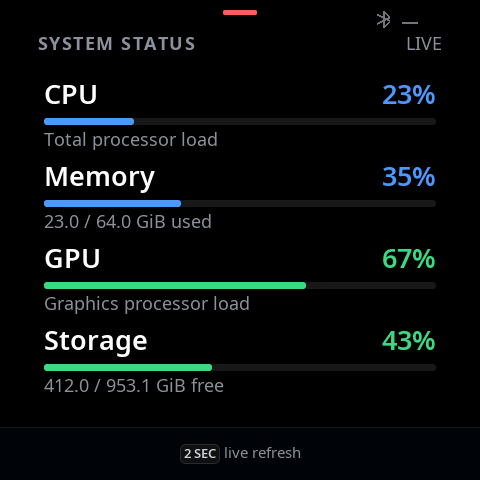
Four readings, every two seconds
The Mac service samples total CPU utilization, used and total memory, graphics utilization, and free and total space on the writable startup volume. CPU is normalized across all cores. Memory includes app, wired and compressed memory. For Macs with multiple graphics accelerators, the GPU meter shows the busiest one.
The storage percentage means free space. It changes color as space runs low. Missing counters show Not available, readings older than ten seconds turn gray and show STALE, and a lost host shows OFFLINE. The first CPU percentage needs two samples.
Readings arrive every two seconds, but unchanged meters do not redraw. This is a deck-only page; subscription allowances stay on Usage, and there is no extra Mac app page.
Where to find it
On a fresh layout, System follows Usage. Your saved layout is preserved during an update, so add it with double-tap Shift → + → System → Enter. Both the firmware and Mac service need the update. If an older service is still running, choose Service → Restart.
Less display work in Flappy Bird
Flappy Bird now refreshes the bird, pipe and score regions instead of invalidating the whole screen on each simulation step. The display path packs partial rectangles correctly, including the rotated Rev A and Rev B panels, and the frame timer accounts for time already spent rendering.
A 360-frame renderer test with multiple and recycled pipes transfers 51.5% fewer pixels on average. That is a transfer-area measurement, not an on-device frame-rate claim. Partial frames are checked against full redraws through score changes, pause and game over. TE synchronization remains disabled, so this is not a promise of tear-free animation.
Music that has room to develop
The three original synthesized tracks now run for 48 bars each: 96 seconds in Flappy Bird, 115.2 seconds in Snake and 76.8 seconds in Raiden. Intros lead into themes, answering melodies, quieter passages and a return, with changing bass patterns, percussion and pulse timbres.
Pausing or retrying the same game keeps your place in the music. Changing games starts that game's theme. Sound stays under your control through Arcade → Sound → Enter: Off, SFX only, or Music + SFX.
Update to 0.10.0
Install the signed, notarized Mac app for Apple Silicon or Intel, or choose Check for Updates. macOS 13 or later is required. Connect your deck over USB-C and choose Service → Updates → Check firmware. The app, service and firmware all report 0.10.0.
Normal application updates retain settings and Bluetooth pairing. Older bootloaders use the existing guided migration. The separate factory ZIPs are for manufacturing and overwrite settings and pairing.
The 0.10.0 firmware was flashed, verified and rebooted over USB on Rev A, and the Mac sampler returned all four metrics. Automated checks cover message validation, compatibility, freshness, rendering, simulation timing and music continuity. Rev B hardware and physical power-loss recovery were not re-tested for this feature.
Get OpenWalkieTalkie v0.10.0, firmware, factory images and checksums on GitHub →