
Version 0.9.0 makes USB speech clearer and adds a reminder for something easy to miss: unused manual usage resets that are about to expire. Update the Mac app and deck firmware to get both improvements.
Listen to the words
We started with a music comparison at 16 kHz and 48 kHz. The listener heard no clear difference. English speech told a different story: with speaker EQ enabled and matched levels, the 48 kHz passage sounded clearer, and noise audible in the 16 kHz version went away.
The deck now uses 48 kHz speaker playback over USB when the connected firmware supports it. The service checks that capability automatically, keeps EQ enabled, and falls back to 16 kHz for older firmware. Playback follows the negotiated rate when switching connections and after releasing push-to-talk.
This improves the playback path; it does not create detail that was absent from the source voice. Our Kokoro test voice produced 24 kHz audio. Sending it through the 48 kHz path avoids the earlier reduction to 16 kHz and changes the compression and reconstruction path as well.
A better 16 kHz path, too
The host now searches alternative ADPCM encoding paths to reduce quantization error, keeping the original result whenever it is better. The firmware replaces linear interpolation with a band-limited filter before sending 16 kHz audio to the 48 kHz DAC.
On the same English passage, the revised encoder reduced squared encoding error by about 30%. That is a digital measurement, not a promise of complete audible hiss removal: the revised 16 kHz path still needs that listening confirmation.
BLE playback and microphone capture remain at 16 kHz. The USB comparison completed without gaps, underruns, queue drops, or sequence errors at either rate. Sustained 48 kHz playback over BLE has not been validated, so this release keeps the higher rate specific to USB.
Use a reset before it expires
The Usage page on your Mac and the Usage face on the deck now show a small amber tip beneath the weekly bar when unused manual reset credits expire within 72 hours. For example: “2 resets expire in 1d 6h.”
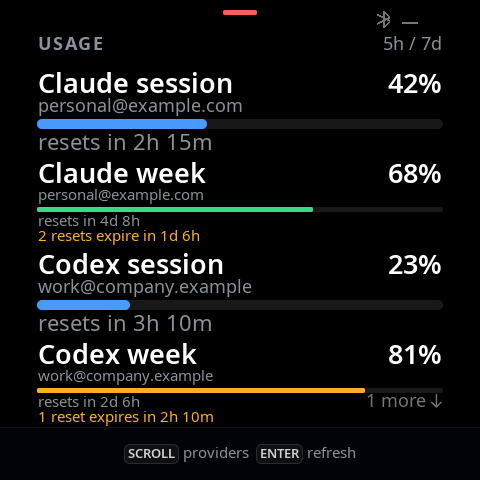
This is separate from the usual countdown until your weekly allowance refreshes. The tip uses the nearest credit expiry and counts only credits with that deadline. It clears when credits are spent or expire, clears the previous account's credits when accounts change, and hides while disconnected. If the provider does not supply the data, no reminder appears. The deck does not redeem a reset for you.
Update both sides
Install the signed, notarized Mac app for Apple Silicon or Intel, or choose Check for Updates. macOS 13 or later is required. Then connect the deck over USB-C and use Service → Updates → Check firmware. The app, service, and firmware should all report 0.9.0.
A normal update preserves settings and Bluetooth pairing on devices using recovery protocol 2. Older recovery versions use the existing guided migration. The board-specific factory ZIPs remain available for manufacturing; their full-chip images overwrite settings and pairing, so use the app updater for an existing device.
The blog is part of the release
The release validator now requires a blog post, its feed entry, blog index link, sitemap entry, and current Mac downloads before publishing the release. The missing 0.7.0 and 0.8.0 posts are also available.
Development firmware and the speech comparisons were checked on Rev A over USB, and normal daemon playback was confirmed at 48 kHz after restarting the updated service. Automated checks cover rate negotiation, connection changes, audio encoding and filtering, reset expiry and account changes, and rendering. Rev B audio was not field-tested in this session.
Get OpenWalkieTalkie v0.9.0, firmware, factory images, and checksums on GitHub →