
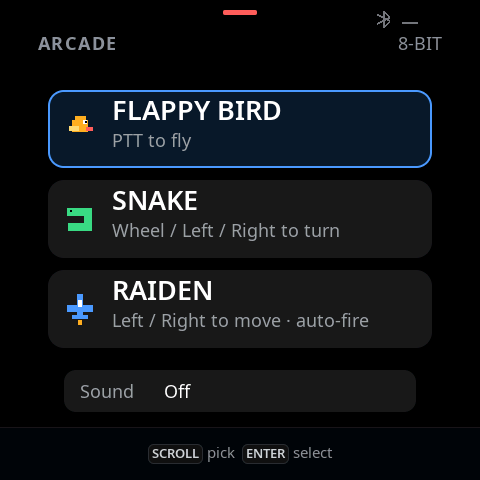
The deck has a wheel, physical buttons, and a 480×480 screen. In 0.6.0, those controls get a new job: three small offline games on a new Arcade page.
Three games, familiar controls
- Flappy Bird: press PTT to flap through the pipes. On Arcade, PTT belongs to the game and never opens the microphone.
- Snake: turn with the wheel, or use Left and Right. Clockwise turns right; counterclockwise turns left. The grid reaches the display edges, with walls around the rounded corners so food stays visible.
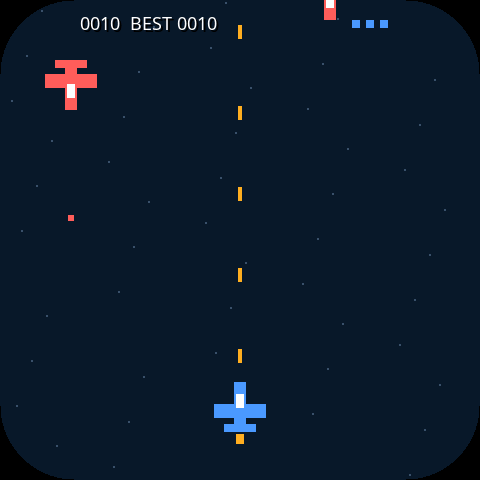
- Raiden (雷电): use Left and Right to move while the plane fires automatically. Dodge descending enemy aircraft and their shots. You have three lives.
The whole display is the playfield
Games fill the display, with a compact score overlaid at the top. Enlarged pixel art stays legible in the hand. Instructions appear when starting or pausing: Enter starts, pauses, resumes, or retries; Cancel returns to the game list. Switching to another face pauses play.
Original 8-bit sound, when you want it
Each game has its own synthesized music loop, with short effects for actions, scores, hits, and game over. There are no audio downloads. Open Arcade → Sound to choose Off, SFX only, or Music + SFX. Off is the default, and volume follows the Speaker setting.
Game audio yields to host speech and capture. With the matching Mac service connected, your sound preference is saved and restored. Offline changes last for the current boot; a new boot starts Off. Best scores also reset when the device restarts.
Add Arcade to your deck
Update both the Mac app and device firmware to 0.6.0. Your existing face layout is preserved. To add Arcade, double-tap Shift → + → Arcade → Enter, then double-tap Shift to leave the manager. New default layouts already include it before Settings.
Use Check for Updates or download the signed and notarized Mac app for Apple Silicon or Intel. macOS 13 or later is required. Connect one deck by USB-C and open Service → Updates → Check firmware.
Devices on the 0.4.0/0.5.0 partition layout and recovery protocol 2 receive a normal application update. Older bootloaders need the guided migration. Keep USB-C power connected and the Mac awake: losing power while replacing the bootloader can prevent startup and USB recovery and require hardware repair. Read the app's warning before proceeding.
What we tested
Game simulation, sound synthesis, protocol, saved settings, and retained-frame rendering have software coverage. Rev A development builds were flashed and tested during development, including full-screen play and the corrected enemy orientation. Rev B gameplay and audible music/effects still need physical testing. No device audio was played during this work.
The 0.6.0 release includes both Mac packages, Rev A/B firmware and migration files, factory images, checksums, build attestations, and a Chinese upgrade guide. Factory images overwrite the entire chip, including settings and pairing data; use the GUI updater for an existing device.